 Pasture Path
Farm record keeping, field by field
Write down what you did when you did it — seeding, compost, a spray, a soil test — against the field it happened on. When the season ends, the report is already written.
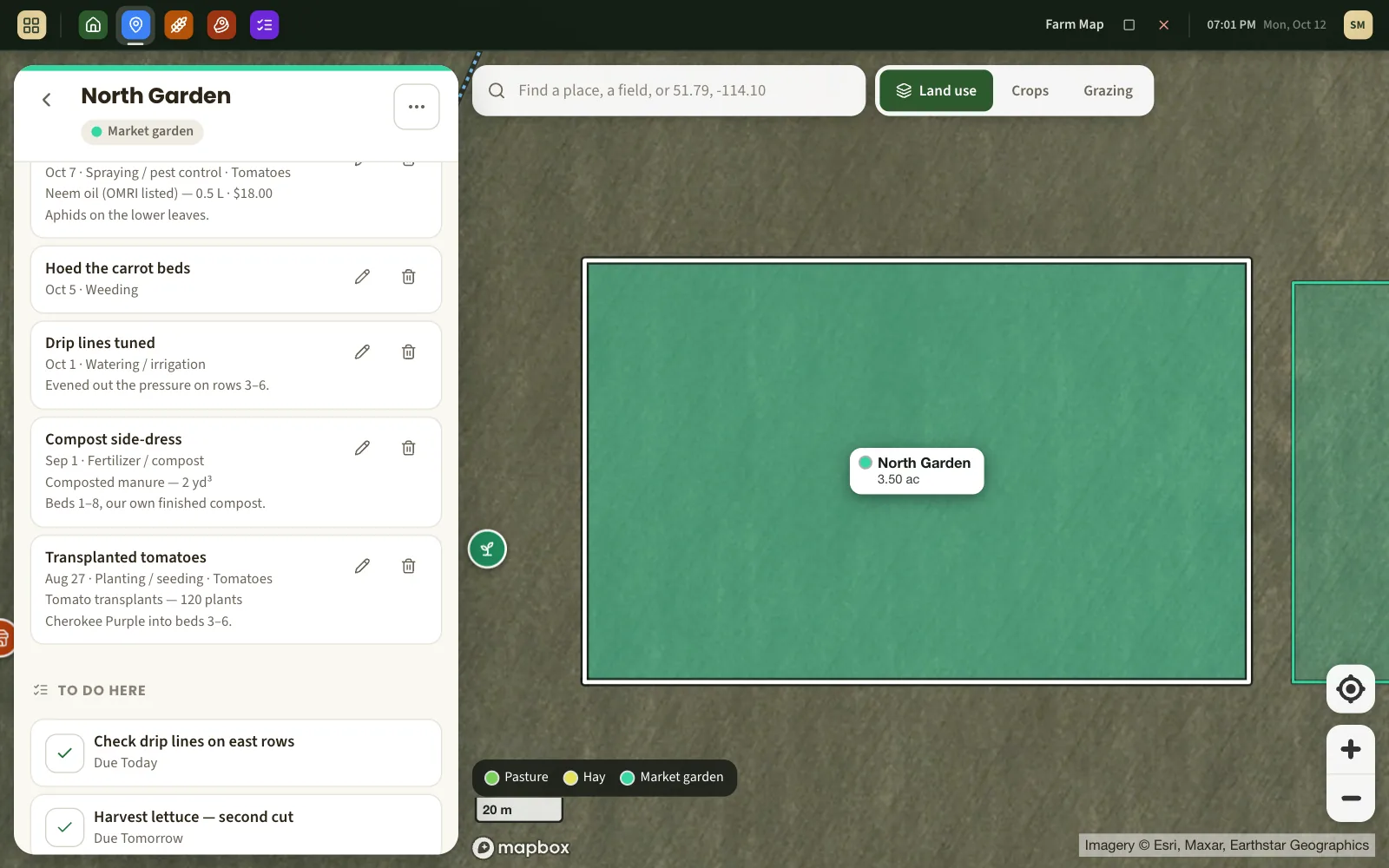
A journal for every field
Open a field, tap Log work, and record it while you are still standing there: what was done, the date, the product and how much of it went on, what it cost, which crop it was for, and a note about the weather or the rate.
- Planting and seeding, fertilizer and compost, spraying and pest control, weeding, tillage, irrigation, mowing and haying, soil tests, crop checks, weather events.
- Product, quantity, unit and cost on any entry.
- Dated the day it happened, not the day you got around to typing it.
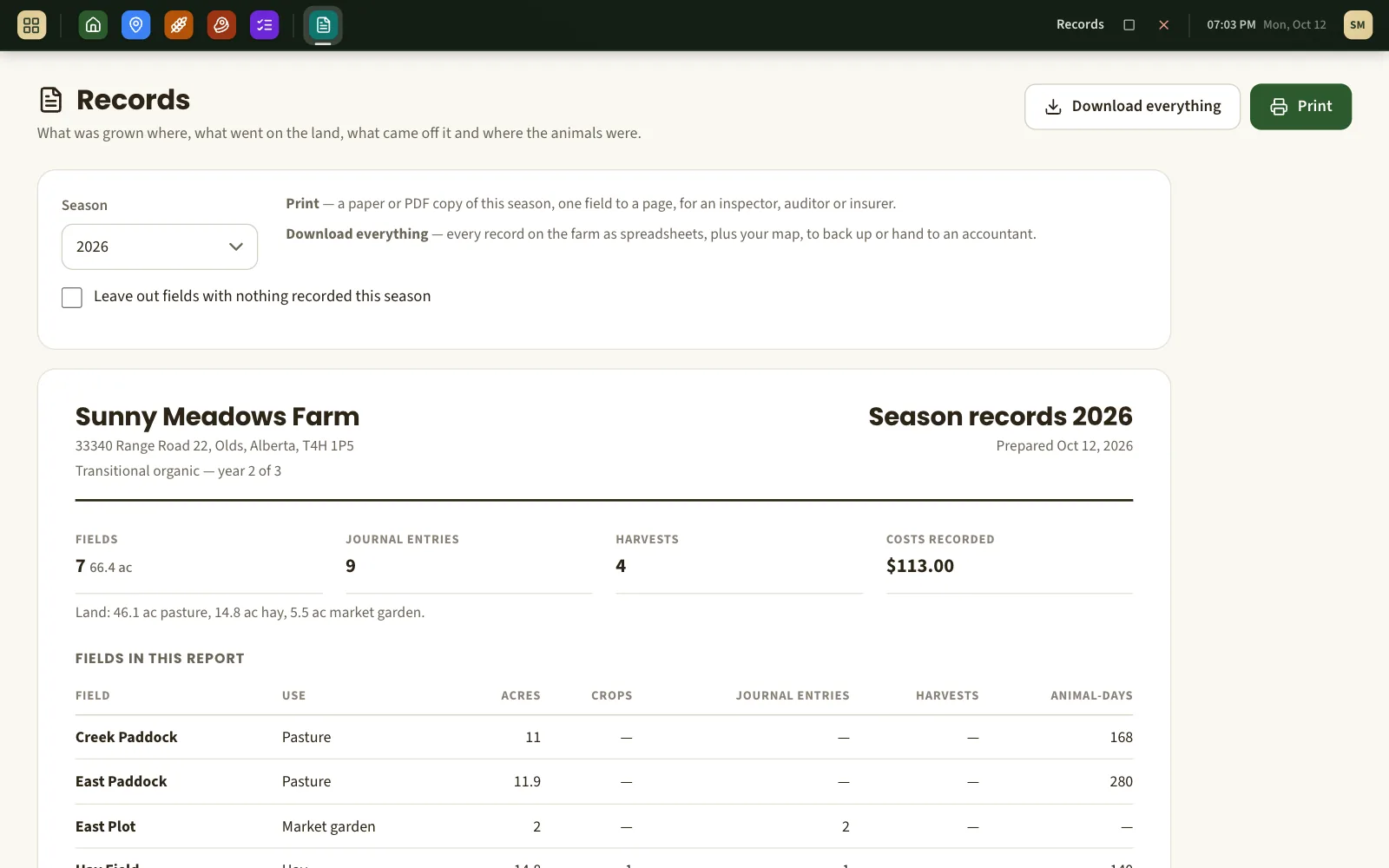
The season report, already assembled
Pick a year and every field is laid out with what was grown on it (and where the seed came from), every dated journal entry, every harvest with its lot number, and every grazing stay. Totals at the top. Print it, or save it as a PDF from the print dialog.
- Legal land description, organic status and acres on each field.
- Input costs added up per field and for the farm.
- One page per field when printed, so an inspector can go through it in order.
For the people who ask to see your records
An organic inspector wants field histories and inputs. A food-safety auditor wants to follow a lot back to a field and a date. A crop insurer wants acres and what was seeded. Your accountant wants the costs. Pasture Path does not certify anything — it keeps what they ask for in one place, in order, with dates.
Your records, in your hands
One button downloads everything the farm has recorded: a spreadsheet each for fields, crops, journal, harvests, livestock, grazing, tasks, products and orders, plus the map as a file. Keep a copy in your own filing every winter if you like.
What it is not
- It is not a certifier and not a compliance guarantee. Your certifier or auditor decides what they accept; ask them before you rely on any format.
- It is not accounting software. It records what inputs cost per field; it does not do your books or your taxes.
- It does not look up product registrations, rates or re-entry intervals. You write down what you applied.
About keeping records here
Will my organic certifier accept these records?
Certifiers generally care that records are complete, dated and can be audited, more than what they are kept in — but the decision is theirs, so show them a printed season report and ask. Our guide to organic record keeping in Canada covers what the standard asks for.
Can I record things after the fact?
Yes. Every entry has its own date, so last week's spraying can be entered tonight and still shows on the right day.
Can I print one field, or one year?
The season report is by year and lists every field. Printing gives each field its own page, so you can pull out the ones you need.
What if I stop using Pasture Path?
Download everything first — it is one button — and you have every record as spreadsheets and your map as a file. Nothing is held back.
Does it track costs?
Each journal entry can carry a cost, and the season report totals them by field. Harvest records can carry price, labour hours and other costs for a rough margin per harvest.
What else Pasture Path does
Farm mapping
Draw fields and paddocks on satellite imagery and get their acres and fence length.
Harvest tracking
Harvests logged in the field, each with a lot number and a label.
Rotational grazing
One-tap moves, a rest-day clock on every paddock, and the next paddock suggested.
Start this season's records today
Free while Pasture Path is in early access. No card, and your records are yours to download whenever you like.