 Pasture Path
Harvest tracking with automatic lot numbers and QR labels
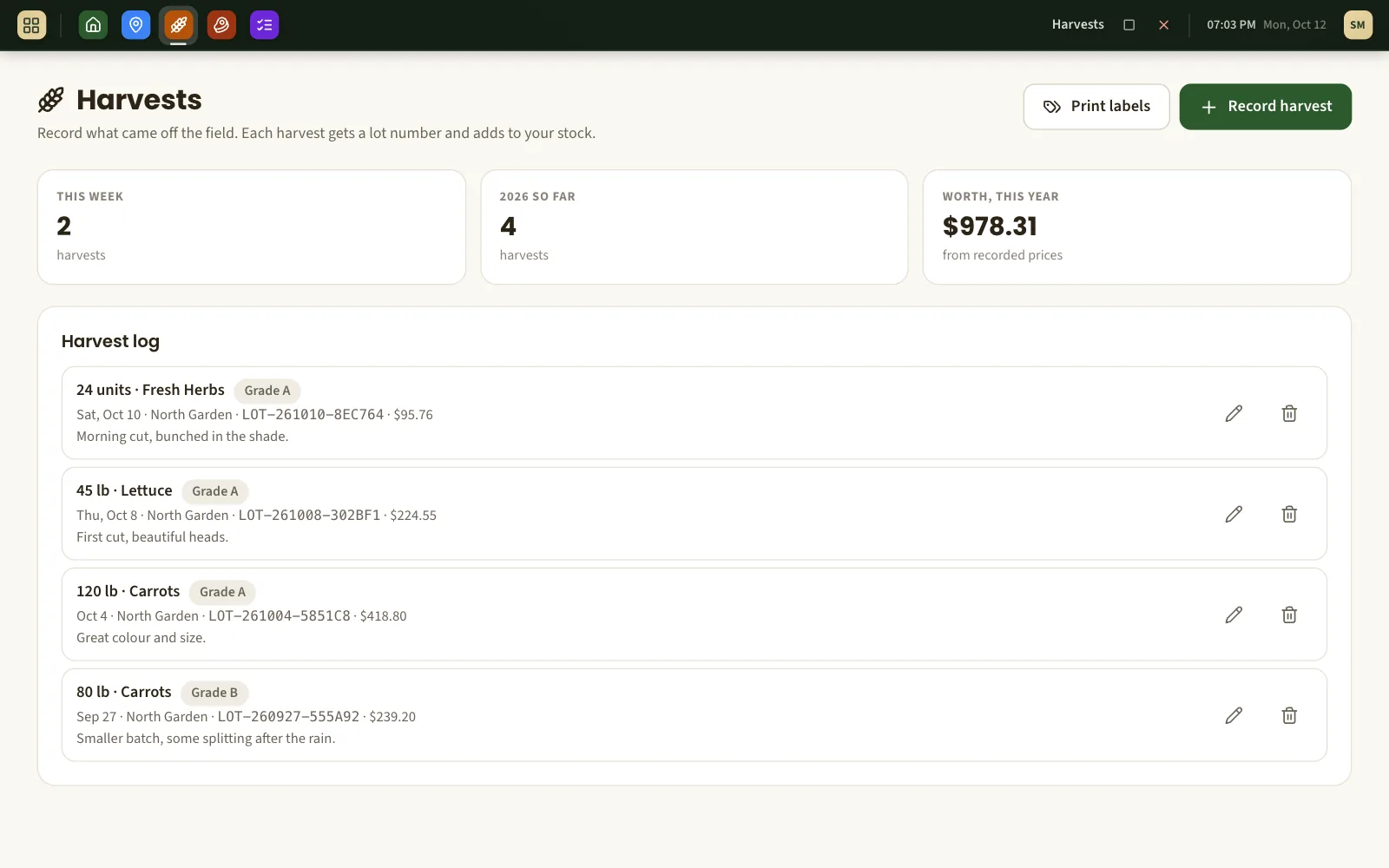
Record what came off the field while you are still in it. Each harvest gets its own lot number, a label you can print, and goes straight into your inventory.
Logged in the field, signal or not
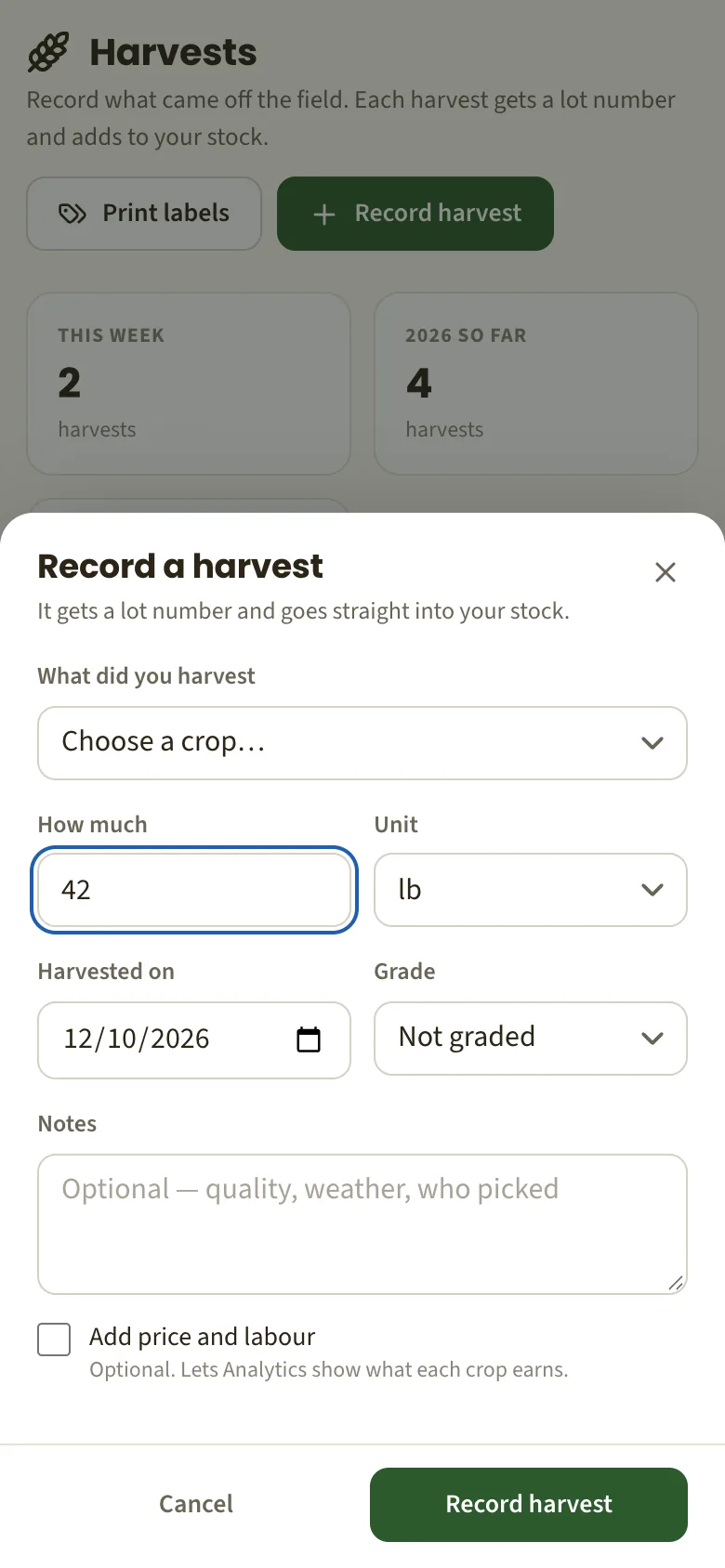
Pick the crop, type the quantity, choose the unit and grade. If there is no signal at the back of the quarter, the harvest is kept on your phone and sent when you are back in range — once, never twice, even if the upload is interrupted.
- Pounds, kilograms, bushels, tons, dozens or units.
- Grade A, B, C or processing, if you grade.
- Optional price, labour hours and other costs, for a margin per harvest.
A lot number without thinking about it
Every harvest is given a lot number made from its date — LOT-261011-4F9A2C, for example — and no two are ever the same. It ties the crate in the cooler to the field, the crop and the day it was picked.
Labels that fit the sheets you already buy
Print labels for one harvest or a whole day's picking, as many copies of each as you have crates. Farm name, crop, variety, harvest date, quantity, grade and the lot number as a barcode.
- Laid out for Avery 5160, 5163, 5164 and 22806 sheets.
- Or one label per page for a roll or thermal printer.
- On wide labels, a QR code a customer can scan to see where it came from.

What your customer sees when they scan
If you sell through Pasture Path, the QR code opens a small page for that lot: the crop and variety, the day it was harvested, its grade, whether it was grown organically, and your farm. Nothing else about your farm is shown.
The shelf keeps up with the field
A recorded harvest adds to that product's stock; correct the quantity and the stock follows. A new crop appears in your inventory unlisted and unpriced — nothing goes on sale until you say so.
What it is not
- It is not a compliance system. It gives every harvest a lot code and keeps the field, crop and date behind it; whether that meets your traceability obligations is for you and your auditor.
- It does not track a lot through processing, mixing or re-packing. One harvest, one lot.
- Offline recording is for harvests. Other screens need a connection to save.
About harvests, lots and labels
Which label sheets does it print on?
Avery 5160 (30 per sheet), 5163 (10 per sheet), 5164 (6 per sheet) and 22806 (2-inch squares), on US Letter paper. Or choose the roll layout for one label per page on a label printer.
Do I have to use the QR code?
No. It only appears on the wider labels, and only when your farm is listed for sale on Pasture Path. Otherwise the label carries the lot number as text and a barcode.
What happens if I record a harvest twice by mistake?
Delete the extra one, and choose whether its quantity should come back off the shelf. A harvest that was merely re-sent by your phone after a bad connection is recognised and not duplicated.
Can I record eggs and milk too?
Yes. Production from livestock — eggs, milk and so on — is recorded per group in the Livestock screen, gets a lot number the same way and adds to stock.
Does it work with my scale or printer?
There is no direct connection to scales. Labels are ordinary PDFs, so any printer that can print a PDF — sheet or roll — will do.
What else Pasture Path does
Farm records
A dated journal for every field and a season report you can print or hand over.
Selling from the farm gate
A page for your farm and orders for pickup. Customers pay you directly.
Farm mapping
Draw fields and paddocks on satellite imagery and get their acres and fence length.
Put a lot number on the next crate
Free while Pasture Path is in early access. No card, and your records are yours to download whenever you like.